Ascend DEX runs on the Midnight Mainnet network. Before you can trade, you’ll need the 1AM wallet browser extension, NIGHT tokens for fees, and DUST for privacy-enabled transactions. This guide walks through the full Mainnet flow end-to-end.
1
Install and Set Up the 1AM Wallet
Add the 1AM wallet to your browser from the Chrome Web Store:Install 1AM WalletThe wallet is currently optimized for browser-based access, with mobile applications planned for future release.During setup you can:
Generate a new wallet locally on your device.
Import an existing recovery phrase or private key.
The wallet is fully self-custodial, so recovery phrases and private keys remain under your control at all times.
Securely store your recovery phrase. Since 1AM is a self-custodial hot wallet, losing the recovery phrase will result in permanent loss of access to wallet funds and assets.
After setup, the wallet connects you to Midnight’s privacy-enabled blockchain ecosystem. 1AM is designed specifically for Midnight’s dual-state architecture, supporting:
Public (unshielded) balances
Private (shielded) balances
2
Connect to the Mainnet Network
After creating or importing a wallet, verify that the wallet is connected to the Mainnet network. The currently active network is displayed at the top of the 1AM wallet interface.
Open the network selector at the top of the wallet.
Confirm that Mainnet is selected.
If another network is active, switch back to Mainnet.
Once Mainnet is selected, the wallet will automatically synchronize with the live Midnight blockchain network. During synchronization:
Wallet balances are updated.
Shielded and unshielded states are refreshed.
Network data is synced with the latest Mainnet state.
Wait until synchronization is complete before proceeding.
3
Generate DUST
DUST is required for privacy-enabled transactions and shielded operations on Midnight.To generate DUST:
Open the 1AM wallet dashboard.
Navigate to the DUST section.
Select Generate Dust.
Complete the generation process.
After DUST generation is complete, the wallet is ready for Mainnet transactions and privacy-enabled interactions.
4
Connect Your Wallet to Ascend DEX
Once your 1AM wallet is synced on Mainnet and funded with NIGHT and DUST, you can connect it to Ascend DEX:dex.ascend.marketOpen Ascend DEX in a browser where the 1AM wallet extension is installed and unlocked.
Click Connect Wallet.
Select 1AM Wallet.
Approve the connection request in the wallet extension.
Once connected, your wallet address will appear on Ascend DEX and balances will begin syncing automatically.After connecting, confirm that:
Your NIGHT balance is visible.
DUST is available.
The wallet is connected to the Mainnet network.
If balances do not appear immediately, allow a few moments for synchronization to complete.
5
Execute a Trade on Ascend DEX
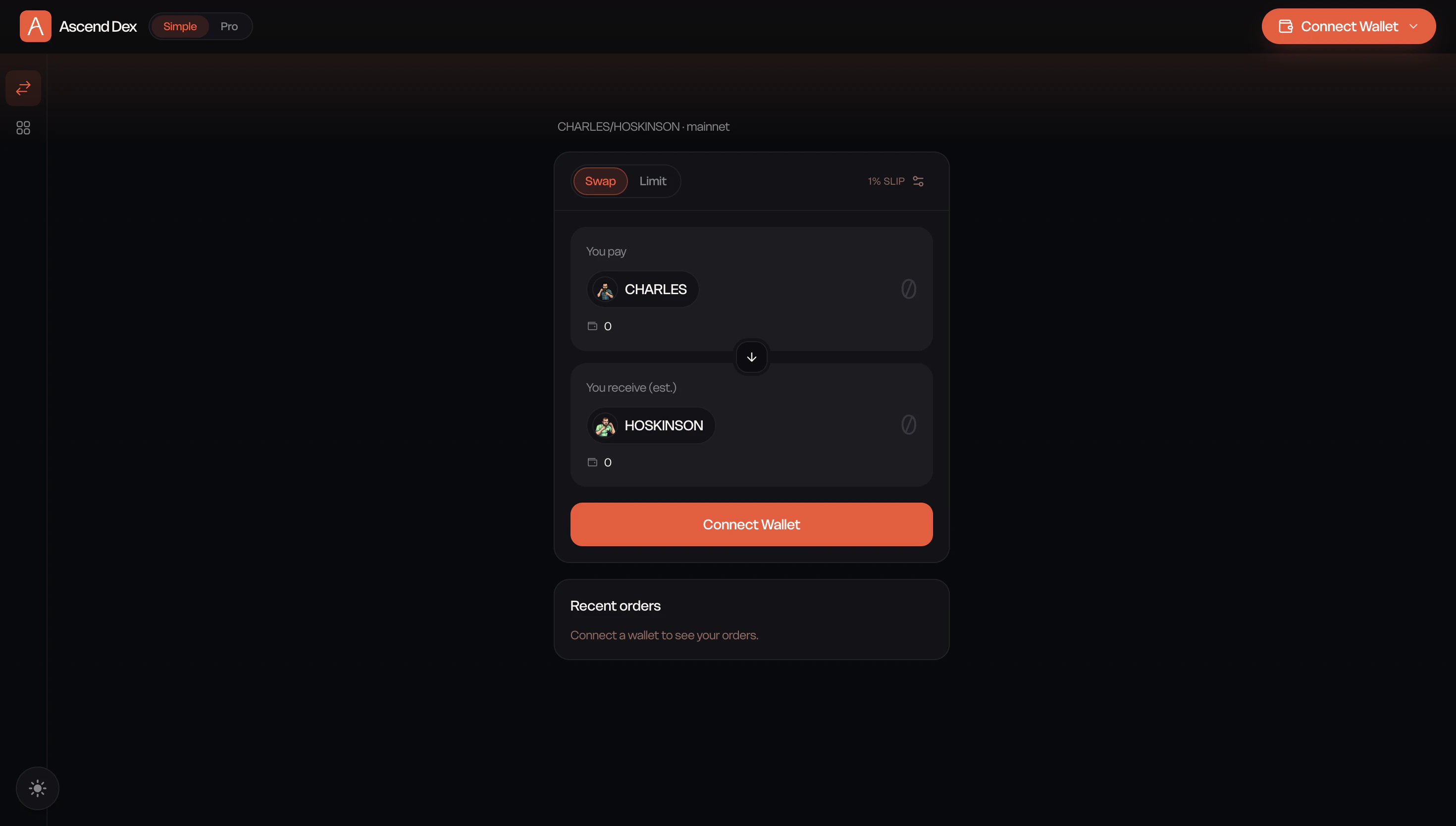
After confirming that your wallet balances are visible and fully synced, you can begin trading on Ascend DEX.Enter Trade DetailsIn the swap interface:
Select the asset you want to swap.
Enter the amount you would like to trade.
Review the estimated output and transaction details.
Ascend DEX: simple swap interface on Mainnet
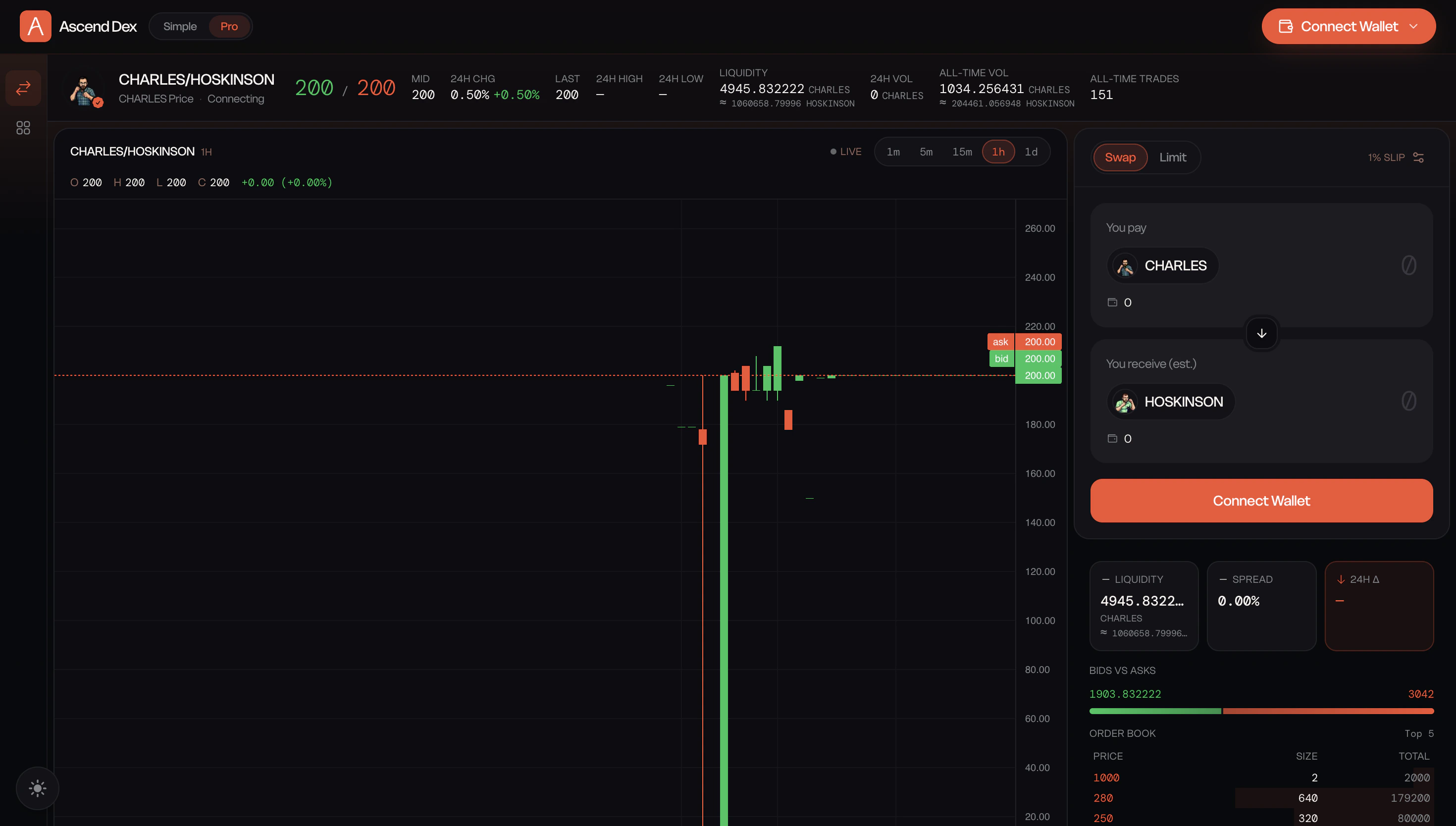
For advanced order types and the full orderbook view, switch to the Pro interface.
Ascend DEX: Pro trading interface on Mainnet
Build the TransactionOnce your trade details are entered, click Build Transaction. Ascend DEX will prepare the transaction and generate the required transaction data for execution.Review and Submit the SwapAfter the transaction has been successfully built:
Click Swap.
The 1AM wallet will open automatically.
Review the transaction details carefully.
Approve the transaction in your wallet.
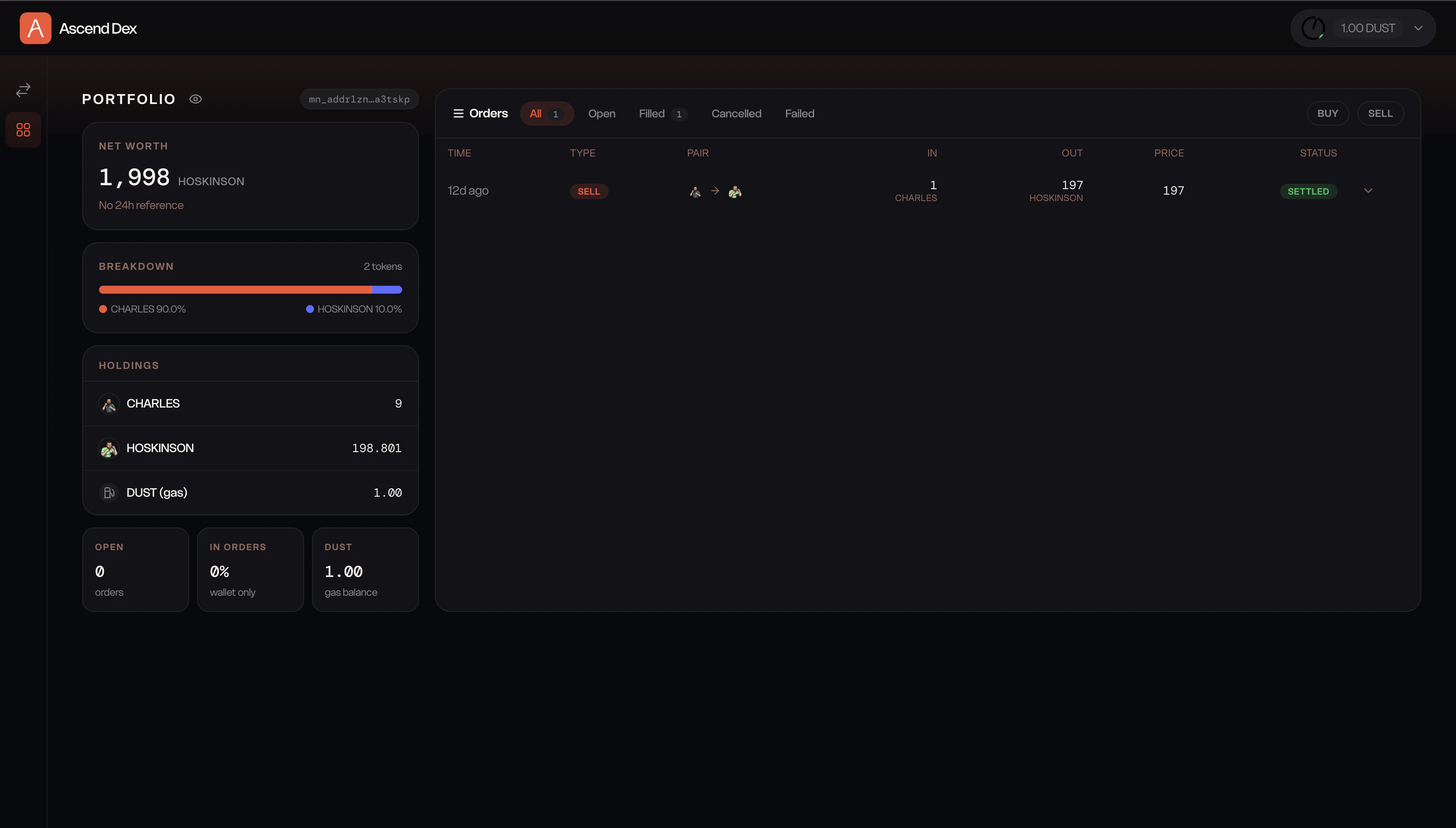
The transaction will be submitted to the Midnight Mainnet for processing. Because Midnight uses privacy-preserving transaction infrastructure, confirmation times may vary slightly compared to traditional public blockchain transactions.Once the transaction is confirmed, updated balances will appear in both your 1AM wallet and the Ascend DEX dashboard. You can review your past trades in the order history view.
Generate and use DUST for privacy-enabled operations.
Participate in the Midnight Mainnet ecosystem using real assets and real liquidity.
{"docsConfig":{"theme":"mint","$schema":"https://mintlify.com/docs.json","name":"Ascend Documentation","colors":{"primary":"#F35233","light":"#F47456","dark":"#871C08"},"logo":{"light":"https://mintcdn.com/acme-58ae63bf/38zxFRKTQVHY9hcO/images/Dark.svg?fit=max\u0026auto=format\u0026n=38zxFRKTQVHY9hcO\u0026q=85\u0026s=6f1d70cb1144c2086f65bb298c2059cf","dark":"https://mintcdn.com/acme-58ae63bf/38zxFRKTQVHY9hcO/images/Light.svg?fit=max\u0026auto=format\u0026n=38zxFRKTQVHY9hcO\u0026q=85\u0026s=b7eb1cb38cc79fe2321ea17d9aac8f7f"},"favicon":"https://mintcdn.com/acme-58ae63bf/38zxFRKTQVHY9hcO/favicon.svg?fit=max\u0026auto=format\u0026n=38zxFRKTQVHY9hcO\u0026q=85\u0026s=28b956213fa17746fb4411a4cc0b97ba","footer":{},"contextual":{"options":["copy","view","chatgpt","claude","perplexity","mcp","cursor","vscode"],"display":"header"},"styling":{"latex":true},"navigation":{"pages":[]}},"deployment":{"deploymentMetadataValue":{"subdomain":"acme-58ae63bf","hasAudioNarration":false,"actualSubdomain":"acme-58ae63bf","customDomains":["docs.ascend.market"],"gitSource":{"type":"github","owner":"skepx","repo":"mintlify-docs","deployBranch":"main","contentDirectory":"","isPrivate":false,"mountPath":"","label":""},"chroma":{"liveDeploymentHistoryId":"6ace87dc5ac743128f9597e5","collectionId":"93290e1a-9198-4bc8-8396-a98002fb1473","schemaVersion":"v3","latestBuiltDeploymentHistoryId":"6ace87dc5ac743128f9597e5"},"entitlements":{},"buildId":"6ace87dc5ac743128f9597e5","clientVersion":"0.0.3926","searchFilterCounts":[{"language":"default","tag":"Documentation","count":25},{"language":"default","tag":"Core Concepts","count":5},{"language":"default","tag":"Agent Skills","count":4},{"language":"default","tag":"Ascend Mainnet","count":4},{"language":"default","tag":"Market Mechanics","count":4},{"language":"default","tag":"Ascend Testnet","count":3},{"language":"default","tag":"Getting Started","count":2},{"language":"default","tag":"Pricing \u0026 Oracles","count":2},{"language":"default","tag":"Risk \u0026 Margin","count":2},{"language":"default","tag":"Intro","count":2}]},"assistantConfig":{"enableAskAiButton":false,"enableStarterQuestions":false,"enableAskAiSearchBar":true},"hasChatPermissions":false,"hasWebMcpPermissions":false,"toggles":[{"name":"kill-isr","enabled":true,"variant":{"name":"disabled","enabled":false,"feature_enabled":true},"impressionData":false},{"name":"agent-mintlify-slack","enabled":true,"variant":{"name":"disabled","enabled":false,"feature_enabled":true},"impressionData":false},{"name":"editor-v7-file-tree","enabled":true,"variant":{"name":"disabled","enabled":false,"feature_enabled":true},"impressionData":false},{"name":"agent-integrations-settings","enabled":true,"variant":{"name":"disabled","enabled":false,"feature_enabled":true},"impressionData":false},{"name":"automations-pr-grouping","enabled":true,"variant":{"name":"disabled","enabled":false,"feature_enabled":true},"impressionData":false},{"name":"custom-prefix","enabled":true,"variant":{"name":"disabled","enabled":false,"feature_enabled":true},"impressionData":false},{"name":"analytics-v7","enabled":true,"variant":{"name":"disabled","enabled":false,"feature_enabled":true},"impressionData":false},{"name":"user-flows-analytics","enabled":true,"variant":{"name":"disabled","enabled":false,"feature_enabled":true},"impressionData":false},{"name":"no-publish-flow","enabled":true,"variant":{"name":"disabled","enabled":false,"feature_enabled":true},"impressionData":false},{"name":"workos-onboarding","enabled":true,"variant":{"name":"disabled","enabled":false,"feature_enabled":true},"impressionData":false},{"name":"llms-txt-v2","enabled":true,"variant":{"name":"disabled","enabled":false,"feature_enabled":true},"impressionData":false},{"name":"pause-universal-search-reconcile","enabled":true,"variant":{"name":"disabled","enabled":false,"feature_enabled":true},"impressionData":false},{"name":"snapshot-serving-live","enabled":true,"variant":{"name":"disabled","enabled":false,"feature_enabled":true},"impressionData":false},{"name":"stripTemperatureMiddleware","enabled":true,"variant":{"name":"disabled","enabled":false,"feature_enabled":true},"impressionData":false},{"name":"per-site-search-delta","enabled":true,"variant":{"name":"disabled","enabled":false,"feature_enabled":true},"impressionData":false},{"name":"support-platform-pylon-zendesk","enabled":true,"variant":{"name":"disabled","enabled":false,"feature_enabled":true},"impressionData":false},{"name":"snapshot-serving","enabled":true,"variant":{"name":"disabled","enabled":false,"feature_enabled":true},"impressionData":false},{"name":"instant-rollback","enabled":true,"variant":{"name":"disabled","enabled":false,"feature_enabled":true},"impressionData":false},{"name":"granular-notifications-server","enabled":true,"variant":{"name":"disabled","enabled":false,"feature_enabled":true},"impressionData":false},{"name":"granular-notifications","enabled":true,"variant":{"name":"disabled","enabled":false,"feature_enabled":true},"impressionData":false},{"name":"editor-private-page-search","enabled":true,"variant":{"name":"disabled","enabled":false,"feature_enabled":true},"impressionData":false},{"name":"automations-fable","enabled":true,"variant":{"name":"disabled","enabled":false,"feature_enabled":true},"impressionData":false},{"name":"fixed-ai-action-pricing","enabled":true,"variant":{"name":"disabled","enabled":false,"feature_enabled":true},"impressionData":false},{"name":"automation-resolve-merge-conflict","enabled":true,"variant":{"name":"disabled","enabled":false,"feature_enabled":true},"impressionData":false},{"name":"scoped-publishing","enabled":true,"variant":{"name":"disabled","enabled":false,"feature_enabled":true},"impressionData":false},{"name":"mintql","enabled":true,"variant":{"name":"disabled","enabled":false,"feature_enabled":true},"impressionData":false},{"name":"page-level-analytics","enabled":true,"variant":{"name":"disabled","enabled":false,"feature_enabled":true},"impressionData":false},{"name":"editor-version-history-v2","enabled":true,"variant":{"name":"disabled","enabled":false,"feature_enabled":true},"impressionData":false},{"name":"editor-nav-generations","enabled":true,"variant":{"name":"disabled","enabled":false,"feature_enabled":true},"impressionData":false},{"name":"billing-page-v2","enabled":true,"variant":{"name":"disabled","enabled":false,"feature_enabled":true},"impressionData":false},{"name":"vite-origin","enabled":true,"variant":{"name":"disabled","enabled":false,"feature_enabled":true},"impressionData":false},{"name":"workspace-projects","enabled":true,"variant":{"name":"disabled","enabled":false,"feature_enabled":true},"impressionData":false},{"name":"assistant-v5","enabled":true,"variant":{"name":"disabled","enabled":false,"feature_enabled":true},"impressionData":false},{"name":"byok-sep-25","enabled":true,"variant":{"name":"disabled","enabled":false,"feature_enabled":true},"impressionData":false},{"name":"fork-pr-previews","enabled":true,"variant":{"name":"disabled","enabled":false,"feature_enabled":true},"impressionData":false},{"name":"revalidation-jwt","enabled":true,"variant":{"name":"disabled","enabled":false,"feature_enabled":true},"impressionData":false},{"name":"editor-agent-model-picker","enabled":true,"variant":{"name":"disabled","enabled":false,"feature_enabled":true},"impressionData":false},{"name":"hobby-abuse-scan","enabled":true,"variant":{"name":"disabled","enabled":false,"feature_enabled":true},"impressionData":false},{"name":"dashboard-inbox","enabled":true,"variant":{"name":"disabled","enabled":false,"feature_enabled":true},"impressionData":false}],"isAtlas":false,"googleFontsInlined":false},"customCss":[],"page":{"pagePath":"ascend-mainnet/orderbook-dex","slug":"/ascend-mainnet/orderbook-dex","pageMetadata":{"title":"Ascend DEX","description":"Step-by-step guide to swapping tokens with Ascend DEX using the 1AM wallet on the Midnight Mainnet network","href":"/ascend-mainnet/orderbook-dex"},"description":{"compiledSource":"\"use strict\";\nconst {jsx: _jsx} = arguments[0];\nconst {useMDXComponents: _provideComponents} = arguments[0];\nfunction _createMdxContent(props) {\n const _components = {\n p: \"p\",\n ..._provideComponents(),\n ...props.components\n };\n return _jsx(_components.p, {\n children: \"Step-by-step guide to swapping tokens with Ascend DEX using the 1AM wallet on the Midnight Mainnet network\"\n });\n}\nfunction MDXContent(props = {}) {\n const {wrapper: MDXLayout} = {\n ..._provideComponents(),\n ...props.components\n };\n return MDXLayout ? _jsx(MDXLayout, {\n ...props,\n children: _jsx(_createMdxContent, {\n ...props\n })\n }) : _createMdxContent(props);\n}\nreturn {\n default: MDXContent\n};\n","frontmatter":{},"scope":{}},"pageType":"default","mdx":{"mdxSource":{"compiledSource":"\"use strict\";const{Fragment:_Fragment,jsx:_jsx,jsxs:_jsxs}=arguments[0];const{useMDXComponents:_provideComponents}=arguments[0];function _createMdxContent(props){const _components={a:`a`,li:`li`,p:`p`,strong:`strong`,ul:`ul`,..._provideComponents(),...props.components},{Frame,Heading,Note,OptimizedImage,Step,Steps,Warning}=_components;if(!Frame)_missingMdxReference(`Frame`,true);if(!Heading)_missingMdxReference(`Heading`,true);if(!Note)_missingMdxReference(`Note`,true);if(!OptimizedImage)_missingMdxReference(`OptimizedImage`,true);if(!Step)_missingMdxReference(`Step`,true);if(!Steps)_missingMdxReference(`Steps`,true);if(!Warning)_missingMdxReference(`Warning`,true);return _jsxs(_Fragment,{children:[_jsx(Note,{children:_jsxs(_components.p,{children:[`Ascend DEX is live on Midnight Mainnet. Please report any issues in our `,_jsx(_components.a,{href:`https://discord.gg/3mHY4RGWyh`,children:`Discord`}),`.`]})}),`\n`,_jsx(Heading,{level:`2`,id:`overview`,children:`Overview`}),`\n`,_jsxs(_components.p,{children:[`Ascend DEX runs on the Midnight Mainnet network. Before you can trade, you’ll need the `,_jsx(_components.strong,{children:`1AM wallet`}),` browser extension, `,_jsx(_components.strong,{children:`NIGHT`}),` tokens for fees, and `,_jsx(_components.strong,{children:`DUST`}),` for privacy-enabled transactions. This guide walks through the full Mainnet flow end-to-end.`]}),`\n`,_jsxs(Steps,{children:[_jsxs(Step,{title:`Install and Set Up the 1AM Wallet`,children:[_jsx(_components.p,{children:`Add the 1AM wallet to your browser from the Chrome Web Store:`}),_jsx(_components.p,{children:_jsx(_components.a,{href:`https://chromewebstore.google.com/detail/1am/bphnkdkcnfhompoegfpgnkidcjfbojjp`,children:`Install 1AM Wallet`})}),_jsx(_components.p,{children:`The wallet is currently optimized for browser-based access, with mobile applications planned for future release.`}),_jsx(_components.p,{children:`During setup you can:`}),_jsxs(_components.ul,{children:[`\n`,_jsx(_components.li,{children:`Generate a new wallet locally on your device.`}),`\n`,_jsx(_components.li,{children:`Import an existing recovery phrase or private key.`}),`\n`]}),_jsx(_components.p,{children:`The wallet is fully self-custodial, so recovery phrases and private keys remain under your control at all times.`}),_jsx(Warning,{children:_jsx(_components.p,{children:`Securely store your recovery phrase. Since 1AM is a self-custodial hot wallet, losing the recovery phrase will result in permanent loss of access to wallet funds and assets.`})}),_jsx(_components.p,{children:`After setup, the wallet connects you to Midnight’s privacy-enabled blockchain ecosystem. 1AM is designed specifically for Midnight’s dual-state architecture, supporting:`}),_jsxs(_components.ul,{children:[`\n`,_jsx(_components.li,{children:`Public (unshielded) balances`}),`\n`,_jsx(_components.li,{children:`Private (shielded) balances`}),`\n`]})]}),_jsxs(Step,{title:`Connect to the Mainnet Network`,children:[_jsxs(_components.p,{children:[`After creating or importing a wallet, verify that the wallet is connected to the `,_jsx(_components.strong,{children:`Mainnet`}),` network. The currently active network is displayed at the top of the 1AM wallet interface.`]}),_jsxs(_components.ul,{children:[`\n`,_jsx(_components.li,{children:`Open the network selector at the top of the wallet.`}),`\n`,_jsxs(_components.li,{children:[`Confirm that `,_jsx(_components.strong,{children:`Mainnet`}),` is selected.`]}),`\n`,_jsxs(_components.li,{children:[`If another network is active, switch back to `,_jsx(_components.strong,{children:`Mainnet`}),`.`]}),`\n`]}),_jsx(_components.p,{children:`Once Mainnet is selected, the wallet will automatically synchronize with the live Midnight blockchain network. During synchronization:`}),_jsxs(_components.ul,{children:[`\n`,_jsx(_components.li,{children:`Wallet balances are updated.`}),`\n`,_jsx(_components.li,{children:`Shielded and unshielded states are refreshed.`}),`\n`,_jsx(_components.li,{children:`Network data is synced with the latest Mainnet state.`}),`\n`]}),_jsx(_components.p,{children:`Wait until synchronization is complete before proceeding.`})]}),_jsxs(Step,{title:`Generate DUST`,children:[_jsx(_components.p,{children:`DUST is required for privacy-enabled transactions and shielded operations on Midnight.`}),_jsx(_components.p,{children:`To generate DUST:`}),_jsxs(_components.ul,{children:[`\n`,_jsx(_components.li,{children:`Open the 1AM wallet dashboard.`}),`\n`,_jsxs(_components.li,{children:[`Navigate to the `,_jsx(_components.strong,{children:`DUST`}),` section.`]}),`\n`,_jsxs(_components.li,{children:[`Select `,_jsx(_components.strong,{children:`Generate Dust`}),`.`]}),`\n`,_jsx(_components.li,{children:`Complete the generation process.`}),`\n`]}),_jsx(_components.p,{children:`After DUST generation is complete, the wallet is ready for Mainnet transactions and privacy-enabled interactions.`})]}),_jsxs(Step,{title:`Connect Your Wallet to Ascend DEX`,children:[_jsx(_components.p,{children:`Once your 1AM wallet is synced on Mainnet and funded with NIGHT and DUST, you can connect it to Ascend DEX:`}),_jsx(_components.p,{children:_jsx(_components.a,{href:`https://dex.ascend.market/`,children:`dex.ascend.market`})}),_jsx(_components.p,{children:`Open Ascend DEX in a browser where the 1AM wallet extension is installed and unlocked.`}),_jsxs(_components.ul,{children:[`\n`,_jsxs(_components.li,{children:[`Click `,_jsx(_components.strong,{children:`Connect Wallet`}),`.`]}),`\n`,_jsxs(_components.li,{children:[`Select `,_jsx(_components.strong,{children:`1AM Wallet`}),`.`]}),`\n`,_jsx(_components.li,{children:`Approve the connection request in the wallet extension.`}),`\n`]}),_jsx(_components.p,{children:`Once connected, your wallet address will appear on Ascend DEX and balances will begin syncing automatically.`}),_jsx(_components.p,{children:`After connecting, confirm that:`}),_jsxs(_components.ul,{children:[`\n`,_jsxs(_components.li,{children:[`Your `,_jsx(_components.strong,{children:`NIGHT`}),` balance is visible.`]}),`\n`,_jsxs(_components.li,{children:[_jsx(_components.strong,{children:`DUST`}),` is available.`]}),`\n`,_jsxs(_components.li,{children:[`The wallet is connected to the `,_jsx(_components.strong,{children:`Mainnet`}),` network.`]}),`\n`]}),_jsx(_components.p,{children:`If balances do not appear immediately, allow a few moments for synchronization to complete.`})]}),_jsxs(Step,{title:`Execute a Trade on Ascend DEX`,children:[_jsx(_components.p,{children:`After confirming that your wallet balances are visible and fully synced, you can begin trading on Ascend DEX.`}),_jsx(_components.p,{children:_jsx(_components.strong,{children:`Enter Trade Details`})}),_jsx(_components.p,{children:`In the swap interface:`}),_jsxs(_components.ul,{children:[`\n`,_jsx(_components.li,{children:`Select the asset you want to swap.`}),`\n`,_jsx(_components.li,{children:`Enter the amount you would like to trade.`}),`\n`,_jsx(_components.li,{children:`Review the estimated output and transaction details.`}),`\n`]}),_jsx(Frame,{caption:`Ascend DEX: simple swap interface on Mainnet`,children:_jsx(OptimizedImage,{src:`https://mintcdn.com/acme-58ae63bf/QgquyIIXFQIlmUbC/images/MAINNET%20SIMPLE.png?fit=max\u0026auto=format\u0026n=QgquyIIXFQIlmUbC\u0026q=85\u0026s=57d90b89cf0cfb9563d1d42f61a0d070`,alt:`Ascend DEX simple swap interface on Midnight Mainnet`,\"data-og-width\":`2940`,width:`2940`,\"data-og-height\":`1668`,height:`1668`,\"data-path\":`images/MAINNET SIMPLE.png`,\"data-optimize\":`true`,\"data-opv\":`3`,srcset:`https://mintcdn.com/acme-58ae63bf/QgquyIIXFQIlmUbC/images/MAINNET%20SIMPLE.png?w=280\u0026fit=max\u0026auto=format\u0026n=QgquyIIXFQIlmUbC\u0026q=85\u0026s=c8a2d0ce3560eb54313486b6a5dd47b8 280w, https://mintcdn.com/acme-58ae63bf/QgquyIIXFQIlmUbC/images/MAINNET%20SIMPLE.png?w=560\u0026fit=max\u0026auto=format\u0026n=QgquyIIXFQIlmUbC\u0026q=85\u0026s=e28b1a7b4d888827fb7de19eeaa54c96 560w, https://mintcdn.com/acme-58ae63bf/QgquyIIXFQIlmUbC/images/MAINNET%20SIMPLE.png?w=840\u0026fit=max\u0026auto=format\u0026n=QgquyIIXFQIlmUbC\u0026q=85\u0026s=169966b99f0a2d54fab7bcc32eb3f899 840w, https://mintcdn.com/acme-58ae63bf/QgquyIIXFQIlmUbC/images/MAINNET%20SIMPLE.png?w=1100\u0026fit=max\u0026auto=format\u0026n=QgquyIIXFQIlmUbC\u0026q=85\u0026s=02e8a480ebe56930b676d343685392e2 1100w, https://mintcdn.com/acme-58ae63bf/QgquyIIXFQIlmUbC/images/MAINNET%20SIMPLE.png?w=1650\u0026fit=max\u0026auto=format\u0026n=QgquyIIXFQIlmUbC\u0026q=85\u0026s=4d1fa04c2b6767107aa52d36d8f63733 1650w, https://mintcdn.com/acme-58ae63bf/QgquyIIXFQIlmUbC/images/MAINNET%20SIMPLE.png?w=2500\u0026fit=max\u0026auto=format\u0026n=QgquyIIXFQIlmUbC\u0026q=85\u0026s=19ee5023f3e4b4d501f352627e672726 2500w`})}),_jsx(_components.p,{children:`For advanced order types and the full orderbook view, switch to the Pro interface.`}),_jsx(Frame,{caption:`Ascend DEX: Pro trading interface on Mainnet`,children:_jsx(OptimizedImage,{src:`https://mintcdn.com/acme-58ae63bf/QgquyIIXFQIlmUbC/images/MAINNET%20PRO.png?fit=max\u0026auto=format\u0026n=QgquyIIXFQIlmUbC\u0026q=85\u0026s=04a7180afffec96af67fe1f28a653322`,alt:`Ascend DEX Pro trading interface on Midnight Mainnet`,\"data-og-width\":`2940`,width:`2940`,\"data-og-height\":`1668`,height:`1668`,\"data-path\":`images/MAINNET PRO.png`,\"data-optimize\":`true`,\"data-opv\":`3`,srcset:`https://mintcdn.com/acme-58ae63bf/QgquyIIXFQIlmUbC/images/MAINNET%20PRO.png?w=280\u0026fit=max\u0026auto=format\u0026n=QgquyIIXFQIlmUbC\u0026q=85\u0026s=b0e305b3fa2c6b511b64d6b0983aea93 280w, https://mintcdn.com/acme-58ae63bf/QgquyIIXFQIlmUbC/images/MAINNET%20PRO.png?w=560\u0026fit=max\u0026auto=format\u0026n=QgquyIIXFQIlmUbC\u0026q=85\u0026s=6e90a482eea3645dbaa6a5b87b860f57 560w, https://mintcdn.com/acme-58ae63bf/QgquyIIXFQIlmUbC/images/MAINNET%20PRO.png?w=840\u0026fit=max\u0026auto=format\u0026n=QgquyIIXFQIlmUbC\u0026q=85\u0026s=ee4ad43478be9fd551dfc69f3cdea4e2 840w, https://mintcdn.com/acme-58ae63bf/QgquyIIXFQIlmUbC/images/MAINNET%20PRO.png?w=1100\u0026fit=max\u0026auto=format\u0026n=QgquyIIXFQIlmUbC\u0026q=85\u0026s=5524b23c9d6fbd2866ad95bdedc93cd1 1100w, https://mintcdn.com/acme-58ae63bf/QgquyIIXFQIlmUbC/images/MAINNET%20PRO.png?w=1650\u0026fit=max\u0026auto=format\u0026n=QgquyIIXFQIlmUbC\u0026q=85\u0026s=8342b0bf317b0991b0c9bb8f329ab970 1650w, https://mintcdn.com/acme-58ae63bf/QgquyIIXFQIlmUbC/images/MAINNET%20PRO.png?w=2500\u0026fit=max\u0026auto=format\u0026n=QgquyIIXFQIlmUbC\u0026q=85\u0026s=93ed69cb0054dfc17778b1b1a481f37b 2500w`})}),_jsx(_components.p,{children:_jsx(_components.strong,{children:`Build the Transaction`})}),_jsxs(_components.p,{children:[`Once your trade details are entered, click `,_jsx(_components.strong,{children:`Build Transaction`}),`. Ascend DEX will prepare the transaction and generate the required transaction data for execution.`]}),_jsx(_components.p,{children:_jsx(_components.strong,{children:`Review and Submit the Swap`})}),_jsx(_components.p,{children:`After the transaction has been successfully built:`}),_jsxs(_components.ul,{children:[`\n`,_jsxs(_components.li,{children:[`Click `,_jsx(_components.strong,{children:`Swap`}),`.`]}),`\n`,_jsx(_components.li,{children:`The 1AM wallet will open automatically.`}),`\n`,_jsx(_components.li,{children:`Review the transaction details carefully.`}),`\n`,_jsx(_components.li,{children:`Approve the transaction in your wallet.`}),`\n`]}),_jsx(_components.p,{children:`The transaction will be submitted to the Midnight Mainnet for processing. Because Midnight uses privacy-preserving transaction infrastructure, confirmation times may vary slightly compared to traditional public blockchain transactions.`}),_jsx(_components.p,{children:`Once the transaction is confirmed, updated balances will appear in both your 1AM wallet and the Ascend DEX dashboard. You can review your past trades in the order history view.`}),_jsx(Frame,{caption:`Ascend DEX: order history on Mainnet`,children:_jsx(OptimizedImage,{src:`https://mintcdn.com/acme-58ae63bf/QgquyIIXFQIlmUbC/images/MAINNET%20ORDER%20HISTORY.png?fit=max\u0026auto=format\u0026n=QgquyIIXFQIlmUbC\u0026q=85\u0026s=f030289e763c30c9db3b2b0cdb5ba37b`,alt:`Ascend DEX order history view on Midnight Mainnet`,\"data-og-width\":`2940`,width:`2940`,\"data-og-height\":`1672`,height:`1672`,\"data-path\":`images/MAINNET ORDER HISTORY.png`,\"data-optimize\":`true`,\"data-opv\":`3`,srcset:`https://mintcdn.com/acme-58ae63bf/QgquyIIXFQIlmUbC/images/MAINNET%20ORDER%20HISTORY.png?w=280\u0026fit=max\u0026auto=format\u0026n=QgquyIIXFQIlmUbC\u0026q=85\u0026s=094cd5cf68811cc579d97426a7355346 280w, https://mintcdn.com/acme-58ae63bf/QgquyIIXFQIlmUbC/images/MAINNET%20ORDER%20HISTORY.png?w=560\u0026fit=max\u0026auto=format\u0026n=QgquyIIXFQIlmUbC\u0026q=85\u0026s=0f197cbb21d7b49db35ec0eae1005e32 560w, https://mintcdn.com/acme-58ae63bf/QgquyIIXFQIlmUbC/images/MAINNET%20ORDER%20HISTORY.png?w=840\u0026fit=max\u0026auto=format\u0026n=QgquyIIXFQIlmUbC\u0026q=85\u0026s=6ca1a6f259a57c2ba099479a271d6069 840w, https://mintcdn.com/acme-58ae63bf/QgquyIIXFQIlmUbC/images/MAINNET%20ORDER%20HISTORY.png?w=1100\u0026fit=max\u0026auto=format\u0026n=QgquyIIXFQIlmUbC\u0026q=85\u0026s=9e131ae3384942369f862567b4b704e6 1100w, https://mintcdn.com/acme-58ae63bf/QgquyIIXFQIlmUbC/images/MAINNET%20ORDER%20HISTORY.png?w=1650\u0026fit=max\u0026auto=format\u0026n=QgquyIIXFQIlmUbC\u0026q=85\u0026s=b5b18cc1480f05bcae13ea238e65d5c4 1650w, https://mintcdn.com/acme-58ae63bf/QgquyIIXFQIlmUbC/images/MAINNET%20ORDER%20HISTORY.png?w=2500\u0026fit=max\u0026auto=format\u0026n=QgquyIIXFQIlmUbC\u0026q=85\u0026s=ed2eecd6a3c4bd592757ef52fbbc6b2a 2500w`})})]})]}),`\n`,_jsx(Heading,{level:`2`,id:`you’re-ready-to-trade`,children:`You’re Ready to Trade`}),`\n`,_jsx(_components.p,{children:`After completing the above steps, you can:`}),`\n`,_jsxs(_components.ul,{children:[`\n`,_jsx(_components.li,{children:`Swap assets on Ascend DEX.`}),`\n`,_jsx(_components.li,{children:`Manage public and shielded balances.`}),`\n`,_jsx(_components.li,{children:`Generate and use DUST for privacy-enabled operations.`}),`\n`,_jsx(_components.li,{children:`Participate in the Midnight Mainnet ecosystem using real assets and real liquidity.`}),`\n`]})]})}function MDXContent(props={}){const{wrapper:MDXLayout}={..._provideComponents(),...props.components};return MDXLayout?_jsx(MDXLayout,{...props,children:_jsx(_createMdxContent,{...props})}):_createMdxContent(props)}return{default:MDXContent};function _missingMdxReference(id,component){throw new Error(`Expected `+(component?`component`:`object`)+\" `\"+id+\"` to be defined: you likely forgot to import, pass, or provide it.\")}","frontmatter":{},"scope":{"config":{},"pageMetadata":{"title":"Ascend DEX","description":"Step-by-step guide to swapping tokens with Ascend DEX using the 1AM wallet on the Midnight Mainnet network","href":"/ascend-mainnet/orderbook-dex"}}},"mdxSourceWithNoJs":null},"mdxExtracts":{"tableOfContents":[{"title":"Overview","slug":"overview","depth":2,"children":[]},{"title":"You’re Ready to Trade","slug":"you’re-ready-to-trade","depth":2,"children":[]}],"codeExamples":{}},"jsLinks":[],"subdomain":"acme-58ae63bf","siteName":"Ascend Documentation","title":"Ascend DEX - Ascend Documentation","navMaps":{"firstHrefInVersion":{},"firstHrefInLanguage":{}},"lastModified":"2026-08-16T17:29:31.392Z","originalFileLocation":"ascend-mainnet/orderbook-dex.mdx"},"headHtml":"\u003cscript data-mint-head>(function(){var d=document.documentElement,p=null;if(!p){try{p=localStorage.getItem(\"isDarkMode\")}catch(e){}if(p==='true')p='dark';else if(p==='false')p='light';if(p!=='light'\u0026\u0026p!=='dark'\u0026\u0026p!=='system')p=\"system\"}var r=p==='system'?(matchMedia(\"(prefers-color-scheme: dark)\").matches?'dark':'light'):p;d.classList.remove(r==='dark'?'light':'dark');d.classList.add(r);d.setAttribute(\"data-theme-preference\",p)})();\u003c/script>\u003cmeta data-mint-head name=\"description\" content=\"Step-by-step guide to swapping tokens with Ascend DEX using the 1AM wallet on the Midnight Mainnet network\">\u003cmeta data-mint-head name=\"application-name\" content=\"Ascend Documentation\">\u003cmeta data-mint-head name=\"generator\" content=\"Mintlify\">\u003clink data-mint-head rel=\"icon\" type=\"image/png\" sizes=\"192x192\" href=\"/mintlify-assets/_mintlify/favicons/acme-58ae63bf/FJX3Hg1dpXLe9caL/_generated/favicon/android-chrome-192x192.png\" media=\"(prefers-color-scheme: light)\">\u003clink data-mint-head rel=\"apple-touch-icon\" type=\"image/png\" sizes=\"180x180\" href=\"/mintlify-assets/_mintlify/favicons/acme-58ae63bf/FJX3Hg1dpXLe9caL/_generated/favicon/apple-touch-icon.png\">\u003clink data-mint-head rel=\"icon\" type=\"image/png\" sizes=\"16x16\" href=\"/mintlify-assets/_mintlify/favicons/acme-58ae63bf/FJX3Hg1dpXLe9caL/_generated/favicon/favicon-16x16.png\" media=\"(prefers-color-scheme: light)\">\u003clink data-mint-head rel=\"icon\" type=\"image/png\" sizes=\"32x32\" href=\"/mintlify-assets/_mintlify/favicons/acme-58ae63bf/FJX3Hg1dpXLe9caL/_generated/favicon/favicon-32x32.png\" media=\"(prefers-color-scheme: light)\">\u003clink data-mint-head rel=\"shortcut icon\" type=\"image/x-icon\" href=\"/mintlify-assets/_mintlify/favicons/acme-58ae63bf/FJX3Hg1dpXLe9caL/_generated/favicon/favicon.ico\" media=\"(prefers-color-scheme: light)\">\u003clink data-mint-head rel=\"icon\" type=\"image/png\" sizes=\"192x192\" href=\"/mintlify-assets/_mintlify/favicons/acme-58ae63bf/FJX3Hg1dpXLe9caL/_generated/favicon-dark/android-chrome-192x192.png\" media=\"(prefers-color-scheme: dark)\">\u003clink data-mint-head rel=\"icon\" type=\"image/png\" sizes=\"16x16\" href=\"/mintlify-assets/_mintlify/favicons/acme-58ae63bf/FJX3Hg1dpXLe9caL/_generated/favicon-dark/favicon-16x16.png\" media=\"(prefers-color-scheme: dark)\">\u003clink data-mint-head rel=\"icon\" type=\"image/png\" sizes=\"32x32\" href=\"/mintlify-assets/_mintlify/favicons/acme-58ae63bf/FJX3Hg1dpXLe9caL/_generated/favicon-dark/favicon-32x32.png\" media=\"(prefers-color-scheme: dark)\">\u003clink data-mint-head rel=\"shortcut icon\" type=\"image/x-icon\" href=\"/mintlify-assets/_mintlify/favicons/acme-58ae63bf/FJX3Hg1dpXLe9caL/_generated/favicon-dark/favicon.ico\" media=\"(prefers-color-scheme: dark)\">\u003cmeta data-mint-head property=\"og:title\" content=\"Ascend DEX - Ascend Documentation\">\u003cmeta data-mint-head property=\"og:description\" content=\"Step-by-step guide to swapping tokens with Ascend DEX using the 1AM wallet on the Midnight Mainnet network\">\u003cmeta data-mint-head property=\"og:site_name\" content=\"Ascend Documentation\">\u003cmeta data-mint-head property=\"og:url\" content=\"https://docs.ascend.market/ascend-mainnet/orderbook-dex\">\u003cmeta data-mint-head property=\"og:type\" content=\"website\">\u003cmeta data-mint-head property=\"og:image\" content=\"https://acme-58ae63bf.mintlify.app/_mintlify/api/og/v2?division=Ascend+Mainnet\u0026amp;title=Ascend+DEX\u0026amp;description=Step-by-step+guide+to+swapping+tokens+with+Ascend+DEX+using+the+1AM+wallet+on+the+Midnight+Mainnet+network\u0026amp;theme=b88a2dc9ab9865aef6e3c85b\u0026amp;signature=6302fbc97a803f07c18838ef49a1588cd7e0071520d848146cf324bbe7bccb50\">\u003cmeta data-mint-head property=\"og:image:width\" content=\"1200\">\u003cmeta data-mint-head property=\"og:image:height\" content=\"630\">\u003cmeta data-mint-head name=\"twitter:card\" content=\"summary_large_image\">\u003cmeta data-mint-head name=\"twitter:title\" content=\"Ascend DEX - Ascend Documentation\">\u003cmeta data-mint-head name=\"twitter:description\" content=\"Step-by-step guide to swapping tokens with Ascend DEX using the 1AM wallet on the Midnight Mainnet network\">\u003cmeta data-mint-head name=\"twitter:image\" content=\"https://acme-58ae63bf.mintlify.app/_mintlify/api/og/v2?division=Ascend+Mainnet\u0026amp;title=Ascend+DEX\u0026amp;description=Step-by-step+guide+to+swapping+tokens+with+Ascend+DEX+using+the+1AM+wallet+on+the+Midnight+Mainnet+network\u0026amp;theme=b88a2dc9ab9865aef6e3c85b\u0026amp;signature=6302fbc97a803f07c18838ef49a1588cd7e0071520d848146cf324bbe7bccb50\">\u003cmeta data-mint-head name=\"twitter:image:width\" content=\"1200\">\u003cmeta data-mint-head name=\"twitter:image:height\" content=\"630\">\u003cmeta data-mint-head name=\"msapplication-config\" content=\"/mintlify-assets/_mintlify/favicons/acme-58ae63bf/FJX3Hg1dpXLe9caL/_generated/favicon/browserconfig.xml\">\u003cmeta data-mint-head name=\"apple-mobile-web-app-title\" content=\"Ascend Documentation\">\u003cmeta data-mint-head name=\"msapplication-TileColor\" content=\"#F35233\">\u003clink data-mint-head rel=\"canonical\" href=\"https://docs.ascend.market/ascend-mainnet/orderbook-dex\">\u003clink data-mint-head rel=\"alternate\" type=\"application/xml\" href=\"/sitemap.xml\">\u003clink data-mint-head rel=\"alternate\" type=\"text/markdown\" href=\"/ascend-mainnet/orderbook-dex.md\">\u003cscript data-mint-head type=\"application/ld+json\">{\"@context\":\"https://schema.org\",\"@graph\":[{\"@type\":\"Organization\",\"@id\":\"https://docs.ascend.market/#organization\",\"name\":\"Ascend Documentation\",\"url\":\"https://docs.ascend.market\",\"logo\":{\"@type\":\"ImageObject\",\"url\":\"https://mintcdn.com/acme-58ae63bf/38zxFRKTQVHY9hcO/images/Dark.svg?fit=max\u0026auto=format\u0026n=38zxFRKTQVHY9hcO\u0026q=85\u0026s=6f1d70cb1144c2086f65bb298c2059cf\"}},{\"@type\":\"WebSite\",\"@id\":\"https://docs.ascend.market#website\",\"name\":\"Ascend Documentation\",\"url\":\"https://docs.ascend.market\",\"publisher\":{\"@id\":\"https://docs.ascend.market/#organization\"}},{\"@type\":\"WebPage\",\"@id\":\"https://docs.ascend.market/ascend-mainnet/orderbook-dex#webpage\",\"url\":\"https://docs.ascend.market/ascend-mainnet/orderbook-dex\",\"name\":\"Ascend DEX\",\"description\":\"Step-by-step guide to swapping tokens with Ascend DEX using the 1AM wallet on the Midnight Mainnet network\",\"dateModified\":\"2026-08-16T17:29:31.392Z\",\"isPartOf\":{\"@id\":\"https://docs.ascend.market#website\"},\"breadcrumb\":{\"@id\":\"https://docs.ascend.market/ascend-mainnet/orderbook-dex#breadcrumb\"}},{\"@type\":\"BreadcrumbList\",\"@id\":\"https://docs.ascend.market/ascend-mainnet/orderbook-dex#breadcrumb\",\"itemListElement\":[{\"@type\":\"ListItem\",\"position\":1,\"name\":\"Ascend Documentation\",\"item\":\"https://docs.ascend.market\"},{\"@type\":\"ListItem\",\"position\":2,\"name\":\"Ascend DEX\",\"item\":\"https://docs.ascend.market/ascend-mainnet/orderbook-dex\"}]},{\"@type\":[\"Article\",\"TechArticle\"],\"@id\":\"https://docs.ascend.market/ascend-mainnet/orderbook-dex#article\",\"headline\":\"Ascend DEX\",\"name\":\"Ascend DEX\",\"description\":\"Step-by-step guide to swapping tokens with Ascend DEX using the 1AM wallet on the Midnight Mainnet network\",\"url\":\"https://docs.ascend.market/ascend-mainnet/orderbook-dex\",\"mainEntityOfPage\":{\"@id\":\"https://docs.ascend.market/ascend-mainnet/orderbook-dex#webpage\"},\"dateModified\":\"2026-08-16T17:29:31.392Z\",\"publisher\":{\"@id\":\"https://docs.ascend.market/#organization\"},\"isPartOf\":{\"@id\":\"https://docs.ascend.market#website\"}}]}\u003c/script>\u003cscript data-mint-head type=\"application/ld+json\">{\"@context\":\"https://schema.org\",\"@type\":\"WebSite\",\"name\":\"Ascend Documentation\",\"creator\":{\"@type\":\"Organization\",\"name\":\"Mintlify\",\"url\":\"https://mintlify.com\"}}\u003c/script>","siteName":"Ascend Documentation","nav":{"global":null,"tabs":[{"tab":"Documentation","groups":[{"group":"Intro","pages":[{"title":"Start Here","href":"/start-here/what-is-ascend"},{"title":"Vision","href":"/start-here/vision"}]},{"group":"Ascend Testnet","pages":[{"title":"Public Testnet User Guide","href":"/ascend-testnet/testnet-guide"},{"title":"Testnet Trading Competition","href":"/ascend-testnet/trading-competition"},{"title":"SNEK Boosted Contest","description":"Hold 250K SNEK on Cardano mainnet and earn a 2x score boost on the SNEK 15-minute market during the Ascend testnet competition.","href":"/ascend-testnet/boosted-contest"}]},{"group":"Ascend Mainnet","pages":[{"title":"Ascend DEX","href":"/ascend-mainnet/orderbook-dex"},{"title":"Ascend Prediction Perps","description":"Please review the following before trading on the Ascend private mainnet beta.","sidebarTitle":"Ascend Prediction Perps","href":"/ascend-mainnet/private-mainnet-beta"},{"title":"Fee Structure","href":"/ascend-mainnet/fee-structure"},{"title":"Ascend Perps","href":"/ascend-mainnet/ascend-perps"}]},{"group":"Liquid Staking","pages":[{"title":"Staking Guide","href":"/liquid-staking/staking-guide"}]},{"group":"Core Concepts","pages":[{"title":"Outcome Probabilities","href":"/core-concepts/outcome-probabilities"},{"title":"Directional Outcome Trading","href":"/core-concepts/directional-outcome-trading"},{"title":"PnL \u0026 Leverage Basics","href":"/core-concepts/pnl-leverage-basics"},{"title":"Perpetual Market Structure","href":"/core-concepts/perpetual-market-structure"},{"title":"Market Types","href":"/core-concepts/market-types"}]},{"group":"Pricing \u0026 Oracles","pages":[{"title":"Index \u0026 Oracle Design","href":"/pricing-oracles/index-oracle-design"},{"title":"Mark Price System","href":"/pricing-oracles/mark-price-system"}]},{"group":"Risk \u0026 Margin","pages":[{"title":"Margin Model","href":"/risk-margin/margin-model"},{"title":"Liquidation Logic","href":"/risk-margin/liquidation-logic"}]},{"group":"Market Mechanics","pages":[{"title":"Funding \u0026 Price Alignment","href":"/market-mechanics/funding-price-alignment"},{"title":"CLOB \u0026 Matching","href":"/market-mechanics/clob-matching"},{"title":"Settlement \u0026 Resolution","href":"/market-mechanics/settlement-resolution"},{"title":"Edge Cases","href":"/market-mechanics/edge-cases"}]},{"group":"Tech Docs","pages":[{"title":"Architecture Overview","href":"/tech-docs/architecture"},{"title":"API Docs","href":"/tech-docs/api-reference"}]}]},{"tab":"Agent Skills","pages":[{"title":"Agent Skills","href":"/agent-skills/overview"}]}]},"title":"Ascend DEX - Ascend Documentation","buildId":"dpl_9DauxEjb9gzCtcuhPQFbquJvx7FJ","deploymentId":"dpl_9DauxEjb9gzCtcuhPQFbquJvx7FJ","dynamics":["07c022d89b","a74be98ba7"],"chunks":["Frame-DpBmNN95.js","DynamicMarkdown-BY_qDhTn.js","zoom-image-lightbox-D4WcYaf4.js","PlusIcon-CwhPVjTe.js","lightbox-handle-r17bVUz3.js"]}